Connection
The Connection tab is where you configure how the API Connector calls your LLM API.
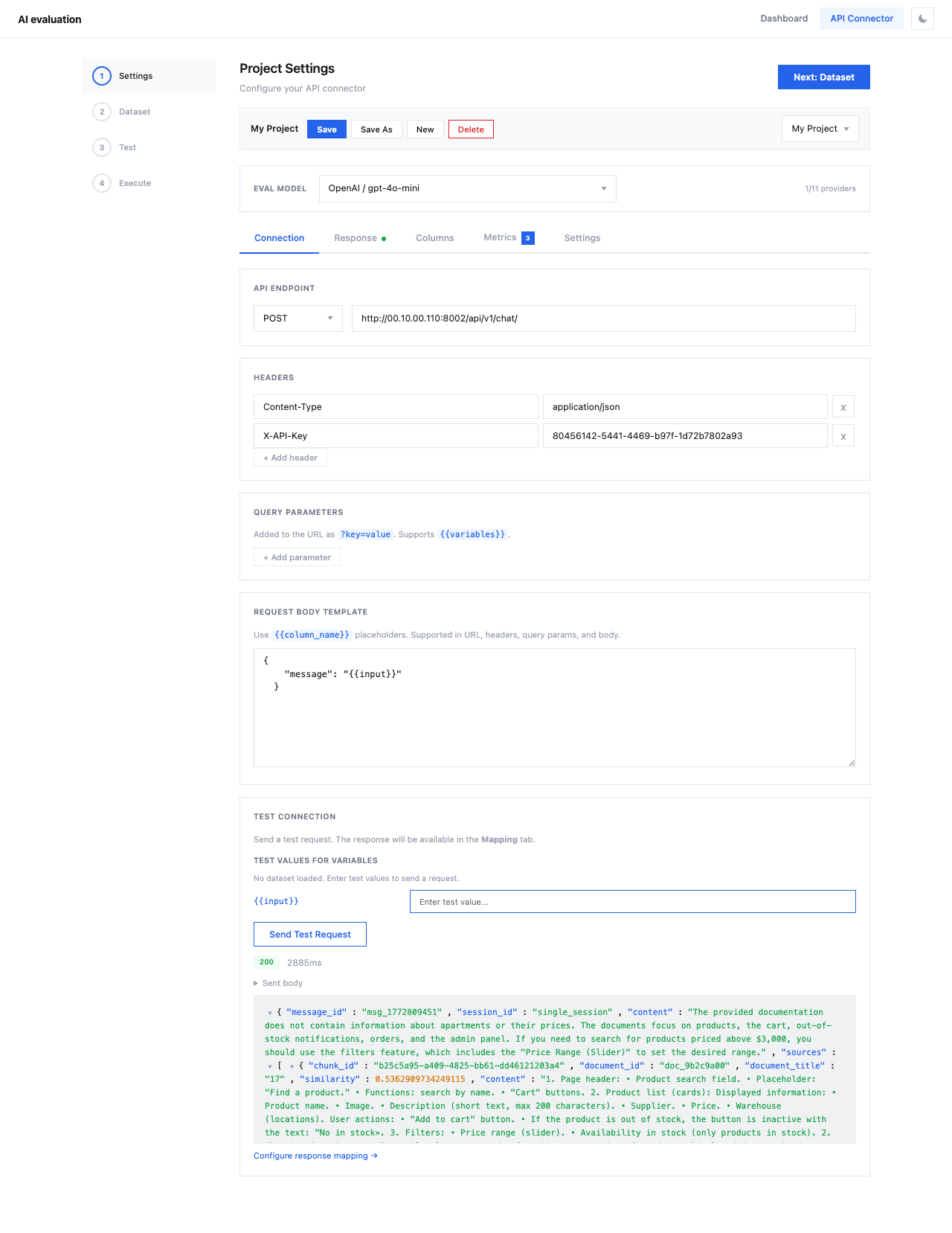
API Endpoint
Set the HTTP method and URL for your API:
- Method —
POST(default) orGET - URL — the full API endpoint URL (e.g.,
https://api.example.com/v1/chat/completions)
The URL supports {{variable}} placeholders that will be replaced with dataset values.
Headers
Configure HTTP headers for authentication and content type:
| Header | Example Value |
|---|---|
Content-Type | application/json |
Authorization | Bearer sk-... |
Click + Add header to add additional headers. Headers also support {{variable}} placeholders.
Query Parameters
Add URL query parameters as ?key=value pairs. These are appended to the API endpoint URL and also support {{variables}}.
Request Body Template
Write the JSON body that will be sent with each API request. Use {{column_name}} placeholders to inject values from your dataset.
OpenAI-compatible API
The placeholders match column names from your dataset (configured in the Columns tab).
Test Connection
Click Send Test Request to verify your API configuration works. The response will be available in the Response tab for mapping.
Tip
Always test your connection before proceeding to the Dataset step. This saves time and avoids wasting API credits on misconfigured requests.