Response Mapping
The Response tab lets you map fields from your API response to evaluation variables using JSONPath expressions.
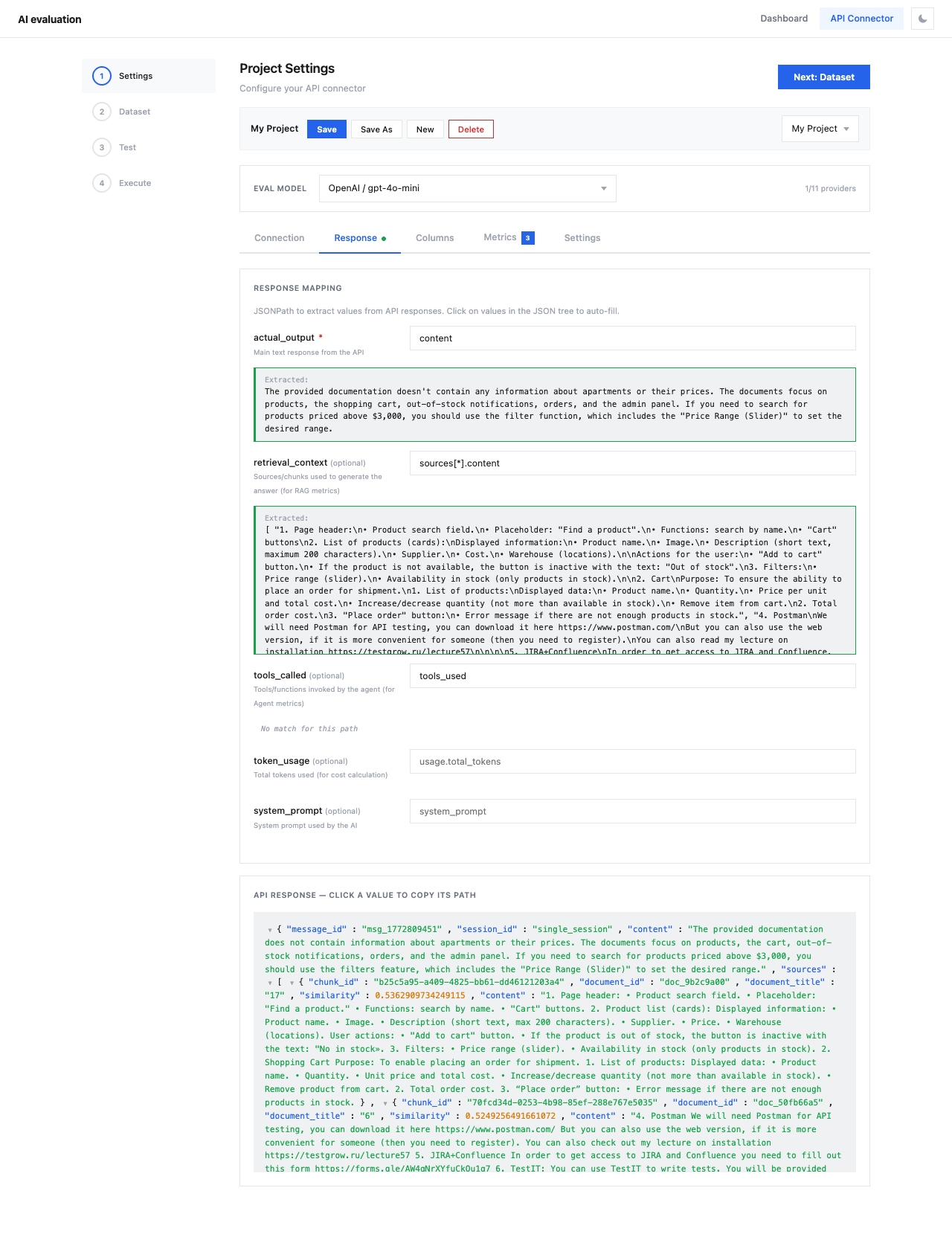
Response Mapping Fields
| Field | Required | Description | Example JSONPath |
|---|---|---|---|
| actual_output | Yes | Main text response from the API | choices[0].message.content |
| retrieval_context | No | Source chunks used for RAG metrics | sources[*].content |
| tools_called | No | Tool/function calls for Agent metrics | tool_calls[*].function.name |
| token_usage | No | Token count for cost calculation | usage.total_tokens |
| system_prompt | No | System prompt used by the AI | system_prompt |
How It Works
- First, send a test request from the Connection tab
- The API response JSON appears in the bottom panel
- Click on values in the JSON tree to auto-fill the JSONPath
- Or manually type JSONPath expressions
OpenAI Response Mapping
For a standard OpenAI API response:
-actual_output: choices[0].message.content - token_usage: usage.total_tokens Note
If no test response is available yet, the bottom panel shows "No test response yet. Send a test request in the Connection tab first."
JSONPath Syntax
| Pattern | Description |
|---|---|
field.subfield | Nested object access |
array[0] | First element of array |
array[*].field | All elements' field values (returns array) |
choices[0].message.content | Deeply nested access |